gThumb 4.0 Alpha: A Modernized Image Viewer and Organizer with GTK4 and Libadwaita
A Fresh Start for a Classic Tool
For years, gThumb has been a reliable open-source choice for viewing and organizing images on Linux. Now it’s getting a major overhaul. The upcoming 4.0 alpha release brings a complete rewrite in Vala and a port to GTK4 and libadwaita. The result is a user interface that looks drastically different from its predecessor—modern, clean, and aligned with today’s GNOME design language. But the changes go beyond the surface: they also introduce support for modern image formats, new export options, and a handy censorship tool. This article dives into what’s new and why this update marks a turning point for gThumb.

Visual Overhaul: From GTK3 to GTK4
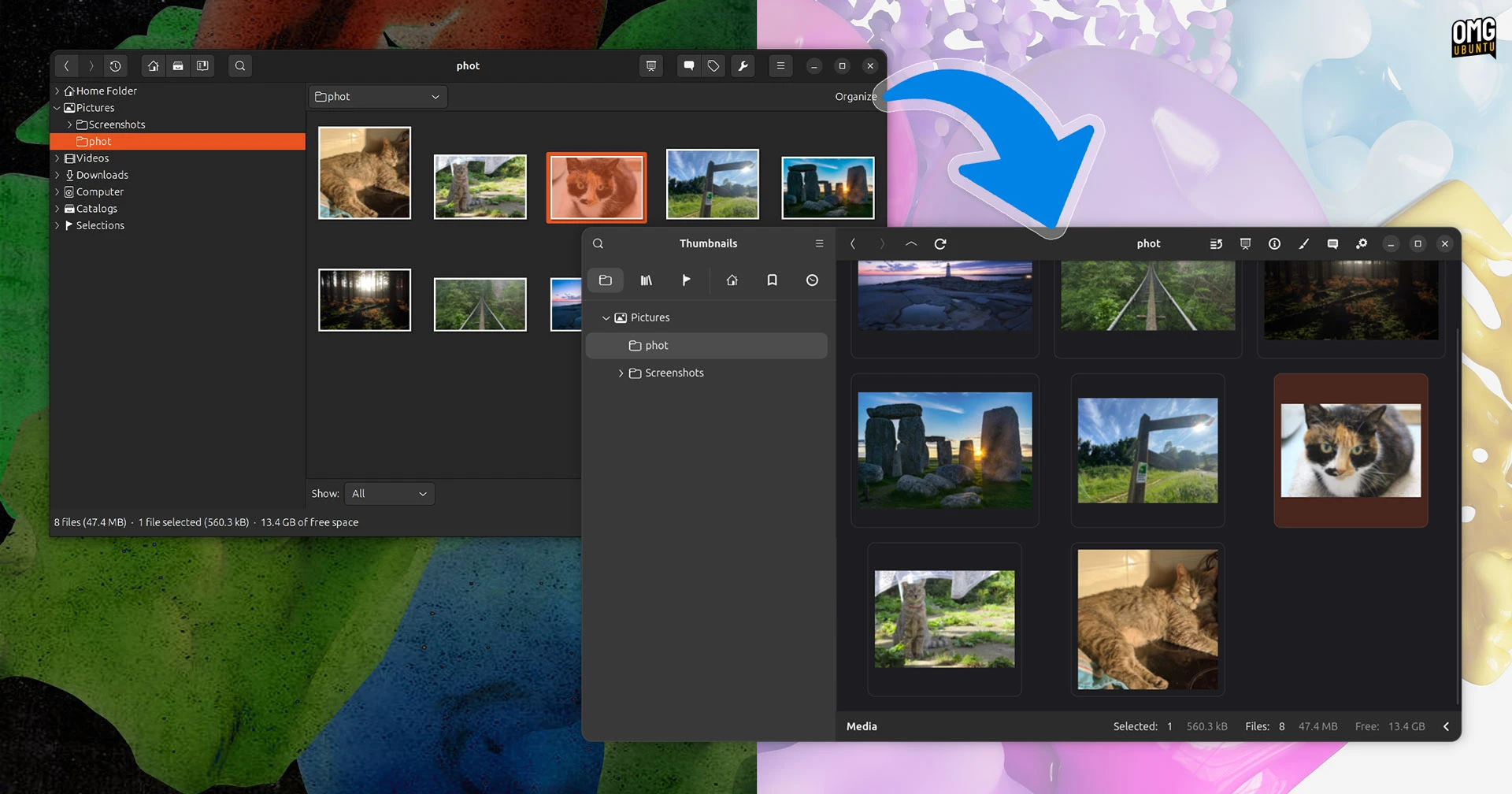
The most striking change in gThumb 4.0 is its visual appearance. By migrating from GTK3 to GTK4 and adopting libadwaita, the application now inherits the smooth curves, subtle shadows, and unified look of contemporary GNOME apps. The old UI, with its dated toolbar and clunky dialog boxes, is almost unrecognizable. Gone are the flat, boxy buttons; in their place are adaptive elements that respond to system themes and preferences.
This isn’t just about aesthetics, either. GTK4 brings performance improvements in rendering and event handling, making image navigation feel snappier. The new header bar—a hallmark of libadwaita—replaces the traditional menu bar, giving users quick access to actions like zoom, rotate, and slideshow. The sidebar and thumbnail view have also been redesigned, providing a clearer hierarchy between folders and files. For long-time users, the change may initially be jarring, but the overall effect is a more intuitive and visually coherent experience.
Why GTK4 Matters
GTK4 is the latest major version of the GTK toolkit, offering better support for high-resolution displays, smoother animations, and a more consistent API. By switching to libadwaita—the official GNOME widget library—gThumb aligns with apps like Nautilus, Loupe, and Text Editor. This means it will automatically respect dark mode, accent colors, and font settings system-wide. The port also paves the way for future features like touchscreen gestures and responsive layouts.
New Features in the Alpha Build
Beyond the visual refresh, gThumb 4.0 alpha brings several functional improvements that extend its utility. Let’s look at the highlights.
Support for WEBP and PNG Animations
Modern web usage relies heavily on animated images, and gThumb now supports both animated WEBP and animated PNG (APNG). Previously, users had to rely on separate viewers or browsers to play such files. Now gThumb can display them seamlessly, with playback controls for pause, stop, and loop. This is especially useful for designers and developers who frequently work with web graphics.
Export Images in JPEG XL (JXL) Format
JPEG XL (JXL) is an emerging image format that offers better compression and quality than legacy JPEG. gThumb 4.0 adds the ability to export images as JXL, making it a practical tool for those who want to archive photos without sacrificing detail. The export dialog includes quality settings and metadata options, so users can fine-tune their output. JXL is still not universally supported, but being able to produce it from gThumb gives early adopters a head start.
Censor Filter for Privacy Protection
Another notable addition is a censor filter that can pixelate or blur selected regions of an image. This is handy for redacting sensitive information (faces, license plates, personal data) before sharing screenshots or photos. The filter is non-destructive, meaning it can be applied, adjusted, or removed within the editing interface. While gThumb has always offered basic editing, this feature adds a layer of privacy control rarely seen in open-source viewers.
Under the Hood: Rewrite in Vala
The jump to version 4.0 also involved rewriting the core application in Vala, a programming language that compiles to C and integrates tightly with GLib and GTK. This rewrite streamlines the codebase, reduces dependencies, and improves maintainability. For users, the most visible outcome is faster startup times and reduced memory usage, as Vala’s modern syntax allows for more efficient object-oriented design.
Porting Challenges and Alpha Status
Because this is an alpha release, some features may be incomplete or unstable. The developers caution that this is not yet ready for daily use, but it provides a glimpse of the final direction. Known issues include incomplete localization, missing plugins, and occasional crashes when handling very large directories. The team encourages testers to report bugs and feedback on the official GitHub repository.
Conclusion
gThumb 4.0 alpha represents a bold step forward for a long-standing image organizer. Its visual transformation with GTK4 and libadwaita brings it in line with modern GNOME apps, while new features like animated image support, JXL export, and a censor filter make it more versatile than ever. Although still in testing, this release signals that open-source image tools can evolve without losing their core purpose. For anyone curious about the future of gThumb, downloading the alpha and exploring the changes firsthand is well worth the effort.
You can download the alpha build from the gThumb official page or compile it from source. Keep in mind that this is a preview—full stability is expected in the 4.0 stable release, likely later this year.
Related Articles
- Firefox’s Free VPN Expands: Users Can Now Choose Server Location – Major Privacy Upgrade
- 8 Critical Ways Fedora Shields Users from Kernel Vulnerabilities
- AMD's HDMI 2.1 FRL Patches for Linux: What You Need to Know
- BleachBit's New Text-Based Interface: A Game Changer for Headless Server Maintenance
- 10 Essential Facts About Linux Mint's New HWE ISOs for Better Hardware Support
- Tracing a QUIC Bug Back to a Linux Kernel Patch: How CUBIC’s Idle Handling Went Awry
- Rust-Powered Terminal Emulator 'Ratty' Introduces 3D Rat Cursor and GPU Rendering
- 10 Key Updates in NVIDIA's Latest Vulkan Beta Drivers