A Practical Guide to Migrating Hyperscale Data Ingestion Systems: Lessons from Meta
Overview
Data ingestion systems form the backbone of modern analytics, reporting, and machine learning pipelines. At Meta, the social graph—one of the largest MySQL deployments globally—feeds petabytes of incremental data into a warehouse daily. Recently, Meta revamped its ingestion architecture to improve reliability at scale, moving from customer-owned pipelines to a self-managed warehouse service. This guide distills the strategies and solutions that enabled a seamless, large-scale migration of thousands of jobs, with zero data loss and minimal disruption.

Whether you're migrating a handful of ETL jobs or an entire enterprise data platform, the principles discussed here—lifecycle management, verification protocols, and controlled rollouts—apply directly to your work.
Prerequisites
Before embarking on a migration of this magnitude, ensure your team has:
- Deep knowledge of existing and target systems – Understand data formats, latency SLAs, and resource profiles of both legacy and new ingestion pipelines.
- Automated testing infrastructure – Ability to compare row counts, compute checksums, and monitor latency and resource usage programmatically.
- Rollback capability – A mechanism to revert individual jobs or the entire workload to the legacy system without data loss.
- Cross-team coordination – Clearly defined owners for data consumers, infrastructure, and operations.
- Monitoring and alerting – Real-time dashboards for data quality, latency, and resource utilization.
Step-by-Step Migration Instructions
1. Establish a Clear Migration Lifecycle
Every job must pass through a defined lifecycle with gates that ensure correctness and performance before progressing. Meta used four stages:
- Shadow Run – Run both old and new pipelines in parallel. Compare outputs without affecting downstream users.
- Validation – Verify data quality and latency meet success criteria.
- Canary Rollout – Switch a small percentage of traffic (e.g., 5%) to the new system.
- Full Rollout – Gradually increase traffic to 100%, with automated rollback triggers.
Each job must pass all criteria in stage 2 before moving to stage 3.
2. Implement Robust Data Verification
Data integrity is non-negotiable. Use two complementary checks:
- Row count comparison – Ensure the number of rows ingested by both systems matches exactly for every batch.
- Checksum validation – Compute a hash (e.g., MD5 or XXHash) over the entire data set, or per partition, to detect any content discrepancy.
Example (pseudocode):
-- Compare row counts
SELECT COUNT(*) FROM legacy_table WHERE batch_id = 1234;
SELECT COUNT(*) FROM new_table WHERE batch_id = 1234;

-- Compute checksum using aggregate hash
SELECT MD5(GROUP_CONCAT(column1, column2, ... ORDER BY primary_key))
FROM legacy_table WHERE batch_id = 1234;
Automate these checks and raise alerts if any mismatch occurs. Only proceed when both checks pass for three consecutive runs.
3. Monitor Latency and Resource Utilization
Beyond data correctness, the new system must match or improve on two key SLAs:
- Landing latency – Time from source update to data available in warehouse. Compare p50, p95, and p99 across systems.
- Resource utilization – CPU, memory, I/O, and network usage. The new system should not exceed legacy resource consumption, ensuring capacity planning remains valid.
If either metric regresses, the migration for that job is paused and an incident is raised.
4. Design Rollout and Rollback Controls
Automated controls prevent blast radius. Key practices:
- Feature flags per job – Use a configuration system that can switch an individual job between old and new pipelines instantly.
- Canary thresholds – Start with 5% traffic and monitor for at least one full day before increasing.
- Automated rollback triggers – If data quality checks fail, or latency exceeds a threshold, the system automatically reverts the job to the legacy pipeline without manual intervention.
- Gradual ramp-up – Increase traffic in steps (5%, 25%, 50%, 75%, 100%) with built-in cooldown periods.
5. Execute the Migration
Phase the migration by job criticality. Start with low-priority, low-volume jobs to validate the process. Once confident, move to high-volume core jobs.
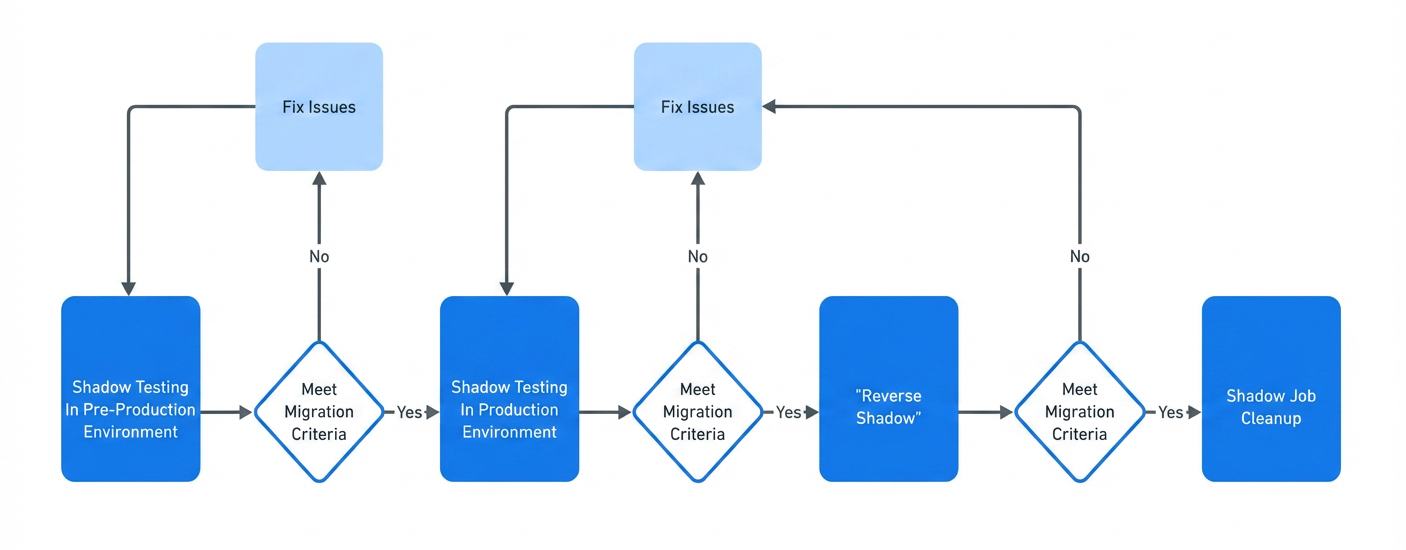
- Enable shadow run for a batch of jobs. Run for 48 hours.
- Verify data correctness, latency, and resource usage. Fix any issues in the new pipeline.
- Enable canary rollout (5%) for each job. Monitor for 24 hours.
- Gradually increase to full rollout, with automated rollback enabled at each step.
- After 100% traffic on new system, continue monitoring for one week before deprecating the legacy system.
Common Mistakes and How to Avoid Them
Mistake 1: Skipping Resource Usage Checks
Teams often focus only on data correctness and latency. Unexpected resource spikes can saturate the new system and affect unrelated jobs. Always benchmark CPU, memory, and I/O. Use the same instance types and configurations during tests.
Mistake 2: Only Checking Row Counts
Row counts can match even if data is corrupted (e.g., swapped columns, truncated values). Always compute a checksum over the entire payload. Use a robust hash function that handles sorting and nulls consistently.
Mistake 3: Manual Rollback Procedures
When latency spikes or data discrepancies appear, manual rollback takes precious minutes. Automate rollback triggers to revert within seconds.
Mistake 4: Migrating Too Many Jobs Simultaneously
Attempting to migrate all jobs at once increases risk and complicates debugging. Use a phased approach, migrating low-risk jobs first to build confidence and refine tooling.
Mistake 5: Ignoring Downstream Impacts
Even if the new pipeline delivers identical data, schema changes or subtle format differences can break downstream consumers. Notify all data consumers and run integration tests.
Summary
Migrating a petabyte-scale data ingestion system requires meticulous planning, automated verification, and robust controls. Meta succeeded by defining a strict lifecycle with data quality, latency, and resource utilization gates; implementing row count and checksum verification; and using canary rollouts with automated rollback. The result: 100% workload transition with zero data loss and improved reliability.
Key takeaways for your own migration:
- Establish clear success criteria before moving jobs forward.
- Automate every verification and rollback step as shown above.
- Phase the migration to manage risk and build confidence.
- Monitor comprehensively throughout the process.
By following these strategies, you can achieve a smooth, large-scale migration without compromising data integrity or operational stability.
Related Articles
- 10 Reasons Why the 2026 Hybrid SUV Is the Ultimate Family Vehicle
- Your Ultimate Step-by-Step Guide to Easing Knee Arthritis Pain with Aerobic Exercise
- Carbonite Backup Service Hit with Critical Performance Lag, Users Report 24-Hour Backup Delays
- Why the Motorola Razr Fold Might Be the Ultimate Foldable: A Week-Long Review
- VSTest Drops Newtonsoft.Json: Key Questions Answered
- How to Choose the Perfect Laptop in 2026: A Comprehensive Guide
- Understanding JetStream 3: A Deep Dive into the Next-Generation Browser Benchmark
- Apple's Week in Review: Chip Triumphs, Orange Trademark Tussles, and Tony Nominations