Master Foreign Songs with Apple Music's New Lyrics Features in iOS 26
Introduction to Apple Music's Enhanced Lyrics
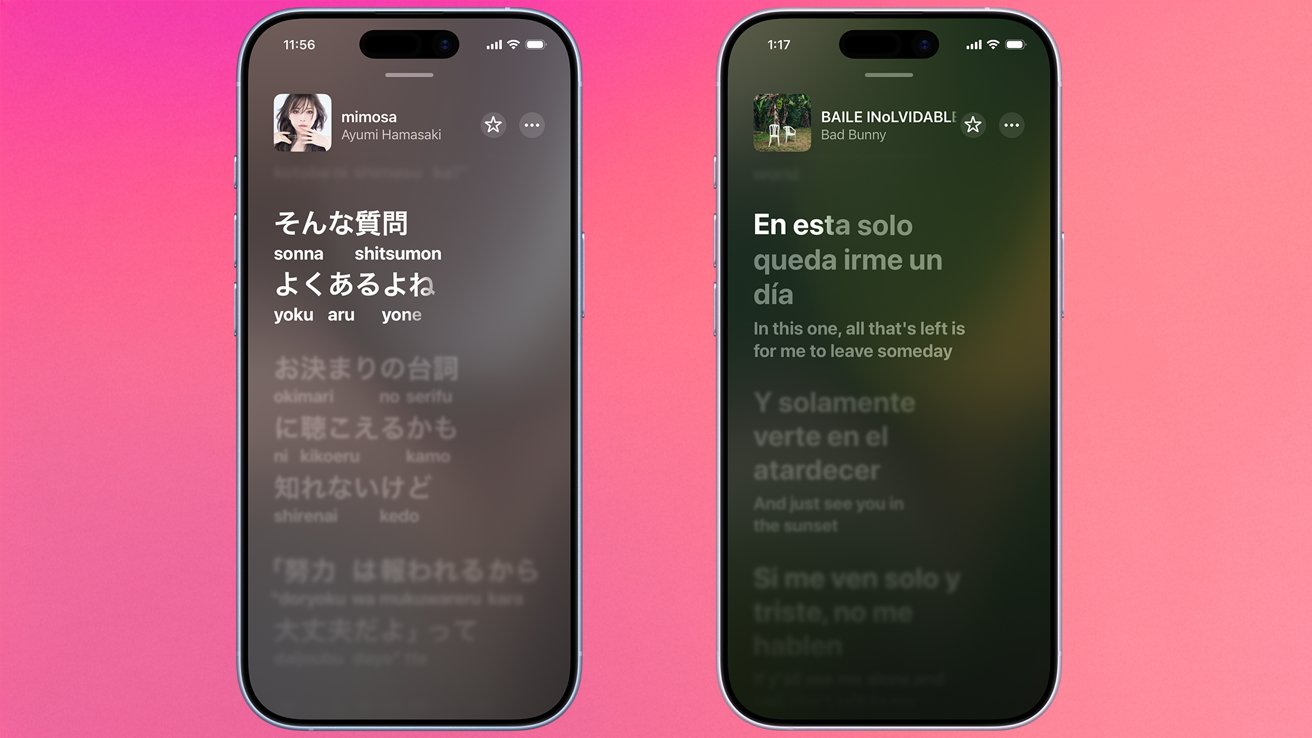
With the release of iOS 26, Apple has significantly upgraded the Apple Music experience by introducing two powerful new tools: Lyrics Translation and Lyrics Pronunciation. These features are designed to help you sing along to your favorite international tracks, even if you don't speak the language. Whether you're a fan of K-pop, Latin pop, or French chanson, Apple Music now makes it easier than ever to understand and perform foreign lyrics. In this guide, we'll walk you through how to access these features and make the most of them.
Accessing Lyrics Translation and Pronunciation
Before you can use these new capabilities, ensure your device is updated to iOS 26. Once updated, open the Apple Music app and play any song. Tap on the Lyrics button (the quote bubble icon) at the bottom of the Now Playing screen to view the synchronized lyrics. For songs that support the feature, you'll notice two new options: a translation icon and a pronunciation guide icon.
Step-by-Step Guide for Lyrics Pronunciation
- Play a song in a foreign language that you'd like to sing along with.
- Tap the lyrics icon to display the text as the music plays.
- Look for the Pronunciation button (often represented by a speaker or phonetic symbol). Tap it.
- The lyrics will now be overlaid with a phonetic guide—a simplified representation of how each word sounds, using characters from your own language. For example, if you’re an English speaker, you might see "nee-oh" for the Korean word "니오."
- Sing along as the guide highlights each syllable. You can toggle the pronunciation on or off at any time.
How to View Translated Lyrics
- While viewing lyrics for a foreign song, tap the Translation button (often a globe or language icon).
- The original lyrics will be replaced or supplemented with a translation in your preferred language. The translation scrolls in sync with the music.
- You can switch between original lyrics, translated lyrics, or view both side by side (if your device supports split view).
- To return to the original view, tap the translation button again.
Why These Features Matter
Apple's addition of Lyric Translation and Pronunciation addresses a long-standing desire among music lovers. Many people enjoy songs from around the world but feel excluded by language barriers. With these tools, you can:

- Learn new languages naturally by seeing how words are pronounced and translated in context.
- Improve your singing accuracy when performing karaoke or covering foreign hits.
- Deepen your appreciation of the song's meaning by reading the translation while listening.
The features are particularly useful for genres like K-pop, J-pop, reggaeton, and other global styles where the original language is integral to the artist's expression. By providing phonetic guides, Apple Music helps users mimic the correct intonation and rhythm without needing formal language training.
Tips for Using Lyrics Features Effectively
To get the most out of these enhancements, consider these practical suggestions:
- Experiment with different songs: Not all tracks support translation or pronunciation yet. Check frequently as Apple updates its library.
- Use the pronunciation guide repeatedly: Practice with the same song to build muscle memory for the sounds.
- Combine with offline listening: Download songs with lyrics enabled so you can practice even without an internet connection.
- Explore curated playlists that highlight international music—Apple often promotes featured translations.
Conclusion
With iOS 26, Apple Music transforms the way we interact with global music. The Lyric Translation and Pronunciation features break down language barriers, allowing you to sing along confidently and understand the stories behind the songs. To start exploring, simply update your device and open Apple Music. For further discussion, check out the AppleInsider forums or continue reading related articles on our site.
Related Articles
- React Native 0.84: Hermes V1 Default, Faster Builds, and Cleaner Architecture
- Resolving HEIC Image Display Issues in Ubuntu 26.04 LTS: A Step-by-Step Guide
- A Practical Guide to Normalizing Data for Consistent Reporting and AI Readiness
- Unlock Your Amazon Fire Tablet: Mastering Fire Toolbox for Google Play, Custom Launchers & More
- Sony's Anniversary Headphones Leak Again: New Renders Reveal White and Black Options
- Ubuntu 26.04 LTS Blocks HEIC Images: Users Face ‘Could Not Load Image’ Error — Here’s the Fix
- Building 20 Apps in 20 Days: A Flutter Developer's Journey into Rapid Prototyping
- Breaking: Apple and Android Now Encrypt Cross-Platform RCS Chats – Rollout Begins